
Project Timeline: Fall 2025
Teammates: Thien Chu, Shah Anarmetov
Robots: PincherX-100, Turtlebot3
This project successfully demonstrated a complete multi-robot delivery system that combines computer vision, manipulation, and navigation as part of one continuous system. The PX-100 robotic arm uses color-based blob detection and the Interbotix IK API to automatically pick up a highlighter and place it into the TurtleBot's box. The TurtleBot3 then navigates through a maze and uses ArUco-based pose estimation to park in a garage and release the highlighter at the drop-off location.
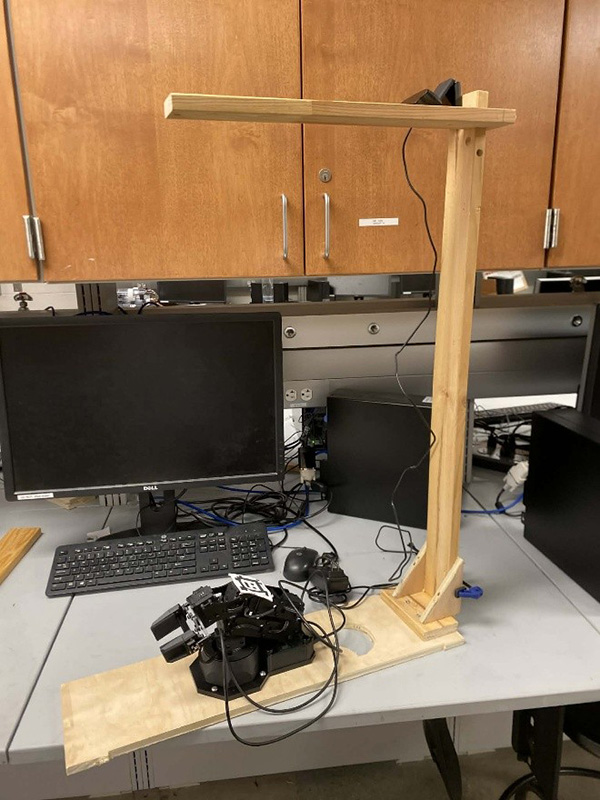
PincherX-100 Robotic Arm
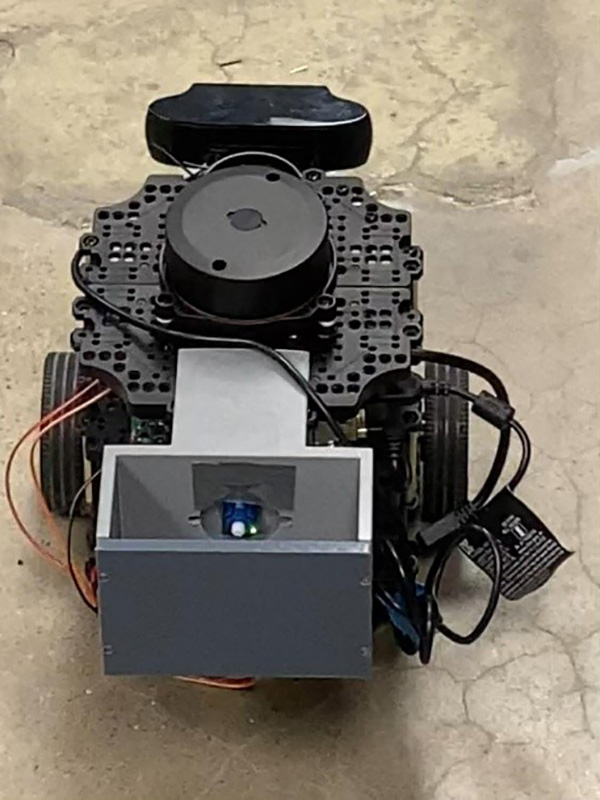
Turtlebot3 Mobile Robot
Video showing the PincherX-100 picking up the highlighter and placing it into the TurtleBot's box
The system leverages the Interbotix API and its built-in inverse kinematics (IK) solver rather than implementing a custom solution.
The built-in solver is already tuned to the PX-100 model for geometry and joint limits, making it less likely to produce unreliable
or strange configurations. The set_ee_pose_components function allows commanding poses directly in x-y-z space, which
matches naturally with 3D target points from the camera. This approach simplifies the task and improves reliability by avoiding
manual computation or tuning of joint positions.
A CS90 Logitech USB camera is mounted above the PX-100, looking down at the arm and the highlighter. The system processes images through several nodes:
/image_raw with calibration data from /camera_infogeometry_msgs/PointStamped on /blob_px/blob_px and /camera_info, uses camera intrinsics and
the measured transform from camera frame to base_link to cast a 3D ray through the pixel, and intersects that ray with the table plane.
The output is a 3D point of the highlighter on the table expressed in the robot base frame, published as /blob_point_base
To improve performance, the camera runs on a separate computer. When the camera node ran inside the ROS2 VM on laptops, the frame rate
was low and images lagged, causing the blob position to be jumpy or delayed. Moving the camera node to a separate machine with direct USB
access provides much faster image processing. ROS2 communication over the network allows topics like /image_raw,
/camera_info, and /blob_point_base to be shared across machines as long as they use the same ROS_DOMAIN_ID.
The pick-and-place node subscribes to /blob_point_base, collects samples and averages them to reduce noise, then executes
a finite state machine with 10 states:
/blob_point_base samples and average themVideo showing the TurtleBot3 navigating through the maze and parking at the drop-off location
After the PX-100 releases the highlighter, the TurtleBot3 Burger transports it through a maze and delivers it to the final depot.
A Logitech C920 USB camera is connected directly to the Raspberry Pi on the TurtleBot using the blue USB 3.0 port. The camera is
mounted on the front of the TurtleBot just below the LiDAR, and the camera node runs directly on the Raspberry Pi. Camera calibration
parameters are loaded through the /camera_info topic to ensure accurate pose estimates.
Before reaching the ArUco parking area, the TurtleBot navigates through a cardboard maze using a left-wall following node. This node relies on LiDAR data to maintain a fixed distance from the left wall by adjusting the robot's angular velocity while driving forward. Once the TurtleBot exits the maze and the ArUco marker becomes visible, the wall-following node is disabled and control is handed over to the parking controller.
An ArUco parking node processes camera images, detects a single ArUco marker, and estimates its pose relative to the camera frame.
The pose is transformed into the TurtleBot base frame and published as a PoseStamped message on the /aruco_pose
topic. ArUco markers were chosen for their reliability in providing repeatable position estimates and robustness to lighting changes.
The system was tested under both low-light and bright conditions, and while the color-based blob detection for the PX-100 was sensitive
to lighting changes and required retuning, the ArUco-based detection remained reliable and consistent.
The parking controller node subscribes to /aruco_pose and generates velocity commands by publishing Twist
messages to /cmd_vel. It operates as a finite state machine with three states:
A simple highlighter release mechanism is mounted on the back of the TurtleBot. A small 3D-printed box holds the highlighter, with a bottom that functions as a trap door driven by a small SG90 servo motor. The servo is controlled by a ROS2 node running on the Raspberry Pi using the RPi.GPIO library to generate a 50 Hz PWM signal. When triggered, the servo rotates from approximately 0° to 180°, opening the trap door and allowing the highlighter to fall out. After the motion is complete, the PWM signal is stopped to prevent jitter.
Video showing the TurtleBot3 parking at the garage and releasing the highlighter
Several enhancements could improve system reliability and applicability to real-world applications:
The architecture of transforming camera measurements into base frame targets and letting controllers handle the motion proved robust and repeatable. The continuous flow from camera detection to 3D position estimation to motion control demonstrates effective use of ROS2's distributed computing model and topic-based communication.